
BetWinner App: Android APK, iOS Access and Account Safety
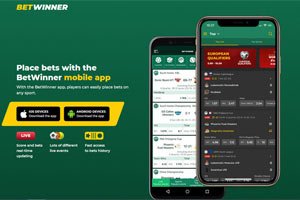
BetWinner App is a mobile betting tool for users who want faster access to sportsbook and casino sections than the desktop site usually provides on a phone. Its real value is operational speed: live markets, cashier tools, bet history, and account actions are easier to reach from one compact interface. In practice, the experience depends on device stability, operating system version, connection quality, and the bookmaker’s current mobile delivery route.
What to verify before using the BetWinner app
The main question is not whether the app is fast or visually convenient. It is whether the installation source, requested permissions, account details and withdrawal route can be verified before money is deposited.
A mobile betting account combines software risk with identity and payment checks. A legitimate-looking interface does not prove that an APK came from the operator, that an iOS listing is current in the user’s country, or that a later withdrawal will pass verification. The safer approach is to review the complete route from installation to payout rather than treating the download as the final check.
Users should also confirm that online gambling is permitted where they are located and that they meet the applicable age requirement. App availability does not by itself establish local legality, licensing coverage or payment acceptance.
Official source, Android APK and iOS access
Begin with the operator’s mobile page reached from its own website navigation. The current official reference is https://betwinner.com/en/mobile. The destination may redirect to another operator-controlled domain or show a different route according to country, device or current distribution policy. A redirect should therefore be checked carefully rather than assumed to be safe merely because the page carries the same branding.
On Android, access may be provided as an APK instead of a normal store installation. Before opening the file, compare the domain with the address used to reach the operator, check that the browser has not renamed the file unexpectedly and avoid copies distributed through messages, social media, file-sharing services or search advertisements. Android may require temporary permission to install an app from the selected browser. That permission should be removed after the installation is complete.
On iPhone, availability can differ by App Store country and may change. Do not rely on an old article that promises a permanent listing. Follow the active iOS option on the official mobile page. When no current listing is shown, the mobile website is the lower-risk alternative because it does not require installing an unknown profile, certificate or configuration package.
A request to disable device security, trust an unfamiliar enterprise certificate or install a configuration profile from an unrelated domain is a reason to stop. The same applies when the package name, publisher identity or requested permissions change without an explanation from the official source.
Permissions and update safety
Permissions should match a clear function. Camera or photo access may be requested when identity documents are uploaded during KYC. Notifications may be used for account messages, but they should remain optional and adjustable. Contacts, call logs, SMS, microphone access and precise location deserve greater scrutiny unless the app explains why a specific feature requires them.
Use the operating system’s permission manager rather than accepting every request during first launch. Grant access only when the related feature is being used, choose limited photo access where the device supports it and remove permissions that are no longer needed. A betting app should not require broad access to personal data merely to display an account balance or open a cashier page.
Updates should be obtained through the same verified route used for installation. Do not install an “urgent update” sent through email, chat or a pop-up on another website. If an Android update fails because the signing identity conflicts with the installed package, do not force the installation. First confirm whether the official package or distribution route has changed. A checksum is useful only when it is published by the same trusted source as the file.
KYC and matching account information
KYC may be requested at registration, after account activity changes or before a withdrawal is approved. The user may be asked for proof of identity, age, address, payment ownership or source of funds. The exact documents and timing can depend on the account, transaction pattern, jurisdiction and payment provider, so the absence of an early check does not mean verification will never be required.
The name, date of birth, address and contact details entered in the account should match the documents that may later be submitted. One-click registration can create incomplete or inaccurate account data, especially when a user does not immediately review the generated profile. Correcting a spelling error is easier before deposits and bets than after a payout has been placed on hold.
Documents should be sent only through the secure account area or another support channel clearly identified on the operator’s own website. Do not send an unredacted identity document to an address found in a forum, messenger group or unsolicited email. Before uploading, check the recipient domain and retain a record of the request, submission date and case reference.
Do not create or operate an account for another person. Shared credentials, conflicting identity details, VPN-related location changes or repeated access from unrelated devices can complicate verification and make it harder to establish who controls the account.
Payment ownership and withdrawals
Use a payment method held in the same legal name as the betting account whenever the available method and local rules permit it. A card, bank account or wallet belonging to another person can create an ownership conflict. Even when a deposit is accepted automatically, the withdrawal may still be reviewed manually and the operator or payment provider may request evidence connecting the account holder to the funds.
Before depositing, open the cashier and check the available withdrawal methods, minimum and maximum amounts, stated processing stages, fees and whether the original deposit route must be used first. Payment options can differ by country and currency. A method visible for deposits is not automatically available for withdrawals, and a fast deposit does not predict a fast payout.
If a withdrawal remains pending, avoid cancelling and resubmitting it repeatedly unless support instructs you to do so. Record the request time, amount, payment method and transaction reference. Check the account inbox and email for a verification request, then answer through a verified support channel. A useful complaint record includes the withdrawal ID, copies of relevant messages and a clear timeline without exposing full card numbers, passwords or one-time codes.
- Before depositing: confirm that the account name and payment-owner name match.
- Before withdrawing: complete any visible verification request and review method-specific conditions.
- While pending: preserve transaction records and avoid opening duplicate requests.
- If rejected: request the stated reason and the exact evidence required for reconsideration.
Responsible gambling controls
Responsible gambling tools are most effective when set before a loss, not after an attempt to recover it. Review the controls available in the account and the operator’s Responsible Gambling and Self-exclusion sections. Depending on jurisdiction and account configuration, tools may include deposit limits, loss or wagering limits, session reminders, time-outs, marketing restrictions and self-exclusion. Where a control is not visible, ask support which restrictions can be applied and how long they remain in force.
A limit should be based on disposable money after essential expenses, not on expected winnings. Do not increase a limit to chase losses, borrow to continue gambling or move activity to another account during a time-out. Disable promotional notifications if they encourage unplanned deposits. Anyone who cannot follow a pre-set limit, hides gambling activity or feels pressure to recover losses should stop and seek independent support.
Self-exclusion is not a temporary troubleshooting tool. It is intended to block access for the selected period and may be difficult or impossible to reverse early. Keep confirmation of the request and check whether it applies only to one account or to a wider group of related services.